
CAPTCHA solvers are tools or services that complete human-verification challenges for an automated browser or script. Some use computer vision or language models. Others route a challenge to a human worker, return a verification token through an API, or emulate the browser behavior around the challenge. The technology can support authorized testing and accessibility workflows, but it can also help an attacker scale scraping, account abuse, spam, or ticket and promotion fraud.
For a website team, the useful question is not whether a solver can answer one puzzle. It is whether the surrounding session, account, device, and request should be trusted. The sections below map solver models to business risk and to safer verification choices for high-value journeys.
What Is a CAPTCHA Solver?
A CAPTCHA solver is an automated or human-assisted mechanism that detects a CAPTCHA challenge, computes or obtains an answer, and submits a response that the protected page can verify. Depending on the implementation, the output may be a typed answer, a click sequence, an audio transcription, or a short-lived token.
The term covers several very different operating models:
- AI or OCR solving reads text, recognizes objects, or interprets an audio challenge.
- Human-solving farms send the challenge to workers who return an answer through a service interface.
- Token and API automation obtains a response token and injects it into the expected callback or request.
- Browser emulation and AI agents reproduce the session behavior around a challenge, sometimes combining several methods.
These categories matter because they create different signals. A fast, repeated answer pattern points to a different control than a distributed human farm, and a valid token still does not prove that the account or device is legitimate.
Use the CAPTCHA overview for the broader distinction between a challenge, a verification result, and the risk decision around it.
How CAPTCHA Solver Services Work
Most services follow a common sequence:
- A browser or script reaches a page that presents a challenge.
- The client identifies the challenge type and gathers parameters such as the page address, site key, or challenge payload.
- An AI model, a human worker, or a combined service produces an answer or token.
- The client submits the result through the expected browser callback or server request.
- The website verifies the response, checks expiry and replay conditions, and decides whether to continue the action.
The final step is easy to underestimate. A CAPTCHA provider can validate that a response corresponds to a challenge, but the website still owns the business decision. A correct response may arrive from a suspicious device, a newly created account, an unusual network, or a session that is submitting hundreds of requests per minute.
AI and OCR solvers
AI-based solvers are effective when the challenge has a predictable visual or audio structure. Their reliability changes as providers alter the challenge, add behavioral checks, or bind a response more tightly to a session. A higher visual difficulty is not a complete answer: it may increase friction for legitimate users while leaving token replay, account velocity, or automation fingerprints untouched.
Human-solving farms
Human farms change the economics rather than removing the risk. A bot can outsource the narrow "prove you are human" step while continuing to automate the surrounding workflow. Distributed workers may also make response latency and geography look less uniform, so origin, device, account, and velocity signals need to be correlated instead of evaluated in isolation.
Token and browser automation
Token-based flows can be fast and difficult to spot if a site checks only whether a token is present. Bind tokens to the intended action, expire them quickly, reject replay, and verify them server-side. Browser automation adds another layer: a session can imitate clicks while still exposing inconsistent device properties, navigation timing, or account behavior.
Why Solver-Assisted Automation Is a Business Risk
Solver access becomes material when it is attached to a valuable workflow. Common targets include account creation, login and recovery, checkout, ticket release, promotional claims, scraping-sensitive pages, and high-volume form submissions.
The impact usually appears in several places:
- Account abuse: automated registration and credential attacks become cheaper when the human-verification step can be outsourced.
- Inventory and promotion abuse: bots can reserve scarce inventory or repeat claims faster than legitimate users.
- Scraping and data loss: solver-assisted crawlers can extract catalog, pricing, or user-generated data at scale.
- Spam and support load: repeated submissions and verification failures create moderation and helpdesk work.
- Conversion damage: challenging every visitor, or sending legitimate users through repeated retries, creates abandonment and accessibility complaints.
- Brand and compliance exposure: an unsafe or confusing verification flow can be imitated by fake pages, while aggressive collection may create privacy-review concerns.
The IETF OAuth Demonstrating Proof of Possession (DPoP) standard provides a useful reference for binding tokens to a key and reducing replay risk. It is not a CAPTCHA specification, but its proof-of-possession model reinforces why a valid response should remain tied to the intended client and action.
How to Detect Solver-Assisted Sessions
Detection works best when the solver is treated as one part of an automated journey. A response that looks human at the challenge endpoint can still sit inside a session with machine-like navigation, account velocity, or device reuse. Security and fraud teams can look for a combination of weak signals rather than relying on a single "solver detected" flag.
| Signal family | Examples to measure | Why it helps |
|---|---|---|
| Challenge timing | Time from challenge render to response, retry intervals, time-of-day distribution | Extremely uniform or highly distributed timing can reveal scripted orchestration or a worker pool |
| Device consistency | Browser features, device fingerprint, cookie continuity, mobile/desktop changes | A valid response paired with a rapidly changing or previously abusive device deserves more scrutiny |
| Journey behavior | Page sequence, pointer/keyboard events, navigation depth, API call order | Solvers usually complete only the verification step; the surrounding journey may remain automated |
| Account and network velocity | Registrations, password resets, checkout attempts, ASN/proxy concentration | Rate and concentration expose campaigns that a single successful challenge can hide |
| Token integrity | Action binding, expiry, replay, callback origin, server-side verification result | Prevents a captured or misapplied token from being reused on a different action |
Use these signals to create investigation cohorts, not to label every unusual visitor as hostile. For example, a short challenge time may be normal for an experienced returning user, while the same timing combined with ten new accounts from one device is materially different. Keep raw signals, derived scores, and policy outcomes separate in logs so analysts can explain why a request was stepped up or blocked.
Detection should also account for solver economics. Human farms can introduce variable latency and geography; AI agents can produce consistent browser fingerprints while changing accounts; token services can produce clean-looking challenge results but fail action binding or replay checks. A layered view makes the control resilient when one solver technique changes.
What Website Teams Should Evaluate
Evaluate the verification layer as part of a control system, not as a standalone puzzle. The following matrix turns a solver signal into an operational response.
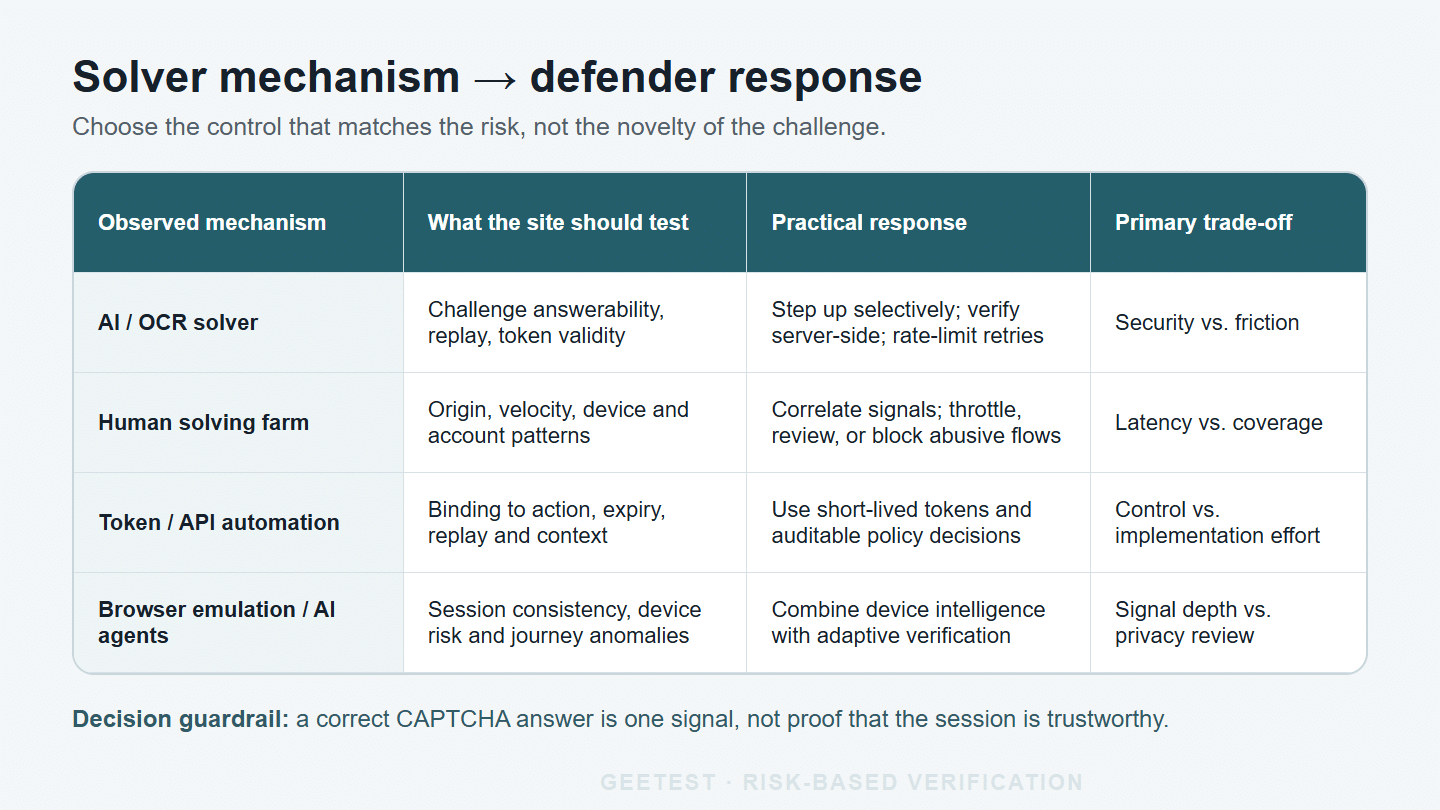
*A solver signal is most useful when it is tied to a specific test, response, and measurable trade-off.*
| Question | Minimum check | Enterprise decision |
|---|---|---|
| What is being protected? | Identify the action’s financial, account, or trust impact | Set stricter policy for login, recovery, checkout, and scarce inventory |
| Which signals are available? | Device, network, behavior, account, velocity, and journey context | Combine signals before escalating friction |
| What happens after a response? | Verify token, expiry, replay, and action binding server-side | Allow, step up, throttle, review, or block with a reason code |
| Who receives friction? | Measure challenge rate by region, device, and user cohort | Reserve visible challenges for sessions that cross a risk threshold |
| Can teams operate it? | Check logs, alerts, dashboards, ownership, and fallback behavior | Give fraud, security, and product teams a change path that does not depend on emergency code releases |
| Is the flow accessible? | Test keyboard, screen-reader, mobile, language, and recovery paths | Treat completion, abandonment, and support contacts as security metrics too |
The W3C Web Content Accessibility Guidelines (WCAG) 2.2 provide a practical accessibility lens for verification flows. WCAG is not a CAPTCHA specification, but its operable, understandable, and robust principles help teams test keyboard, screen-reader, mobile, and recovery paths before increasing challenge friction.
A Risk-Based Response to Solver Traffic
An effective response can be organized as observe -> assess -> step up -> act. Observe the request and its context. Assess the combined risk against a documented policy. Step up only when the risk justifies more verification. Then act: allow a low-risk request, slow it down, ask for another check, route it for review, or block it.
For enterprise teams, this is where an adaptive verification layer fits better than a permanently difficult puzzle. GeeTest Adaptive CAPTCHA can serve as a risk-based step-up experience, while Device Fingerprinting can contribute device-risk context and a Business Rules Engine can apply organization-specific response policy. These roles are complementary: the challenge is the user-facing verification step; device and behavior signals provide context; policy decides what happens next.
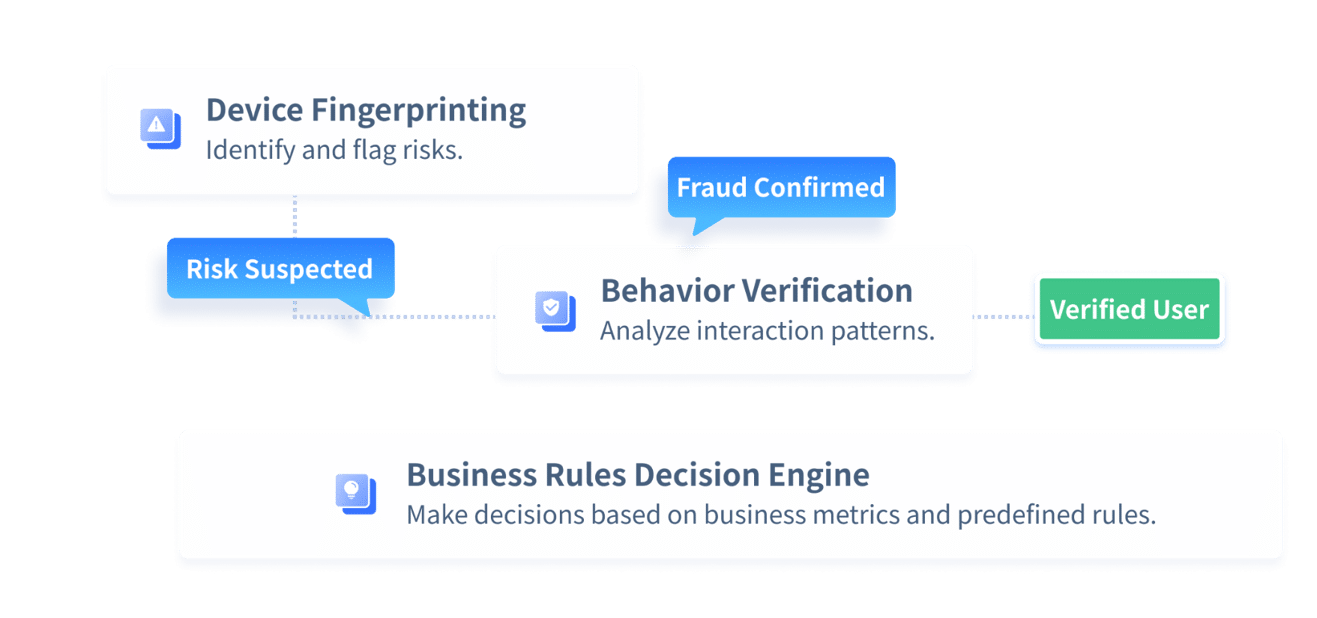
*A layered verification program combines user-facing checks with device, behavior, and policy context.*
Start with a controlled proof of concept. Measure legitimate completion, challenge rate, false positives, latency, abandonment, replay attempts, suspicious-account creation, and support contacts. Keep thresholds and retention periods subject to your privacy and security review. Do not copy a score from another website and assume it transfers to your traffic.
Implementation checklist
Before deploying or changing a CAPTCHA layer, confirm that:
- Each protected journey has a named abuse case and an accountable owner.
- Tokens are short-lived, action-bound, verified server-side, and protected against replay.
- Rate limits and account controls still apply when a CAPTCHA response is valid.
- Failure, timeout, JavaScript blocking, and accessibility recovery paths are documented.
- Challenge and abandonment metrics are segmented by device, region, and journey.
- A provider outage or network failure has a safe fallback that does not silently open the flow.
- Security, product, and support teams can review decisions and update policy together.
Final Takeaway: Treat CAPTCHA Defense as a Moving Contest
The contest between CAPTCHA defenses and solvers is dynamic. There is no CAPTCHA that can never be defeated, and no solver that can defeat every CAPTCHA in every context. A challenge that resists one technique today may face a new model, human farm, replay path, or browser strategy tomorrow; a solver that succeeds in a lab may fail when device, account, velocity, and journey signals are evaluated together.
When attacks continue, adding more challenge difficulty is not the only answer. Use business controls to find and close the path the attacker is exploiting: tighten registration or recovery rules, limit high-risk transactions, require stronger signals for unusual devices, and route suspicious sessions to review. A Business Rules Engine can help teams express those decisions from the business side and update them as abuse patterns change. Pair that policy layer with a verification product that updates its detection and challenge mechanisms over time, so the defense can adapt without forcing every legitimate visitor through maximum friction.
For a practical next step, security and fraud teams can evaluate GeeTest Adaptive CAPTCHA alongside device context and business rules on one high-value journey, define success and false-positive measures, and expand only when the evidence supports it.
FAQ
1. Is a CAPTCHA solver illegal?
The legality depends on jurisdiction, authorization, contract terms, and what the automation does. Authorized accessibility work, testing, and research can differ materially from bypassing a site’s controls to commit fraud or violate terms. Treat this as a compliance question for your legal team, not as legal advice.
2. Is there a free CAPTCHA solver?
Free extensions and limited services exist, but "free" does not establish reliability, safety, authorization, or suitability for a business workflow. Website owners should focus on threat modeling and verification policy rather than assuming that a free solver represents the full risk.
3. What is the best CAPTCHA solver?
There is no universal best solver. Model accuracy, human fallback, supported challenge types, latency, API controls, privacy terms, and authorization all change the fit. For a website team, the more important evaluation is whether the verification system can identify solver-assisted abuse and apply a proportionate response.
4. Is there a way to bypass a CAPTCHA?
Some attackers use automated recognition, human farms, token abuse, or browser emulation. Explaining those categories helps defenders model risk, but operational bypass instructions can enable abuse. A safer engineering goal is to validate responses server-side, detect replay and anomalous context, and use adaptive step-up controls.